Hi~welcome to shenzhen xinmu display technology co., ltd.!

2025-06-15 209
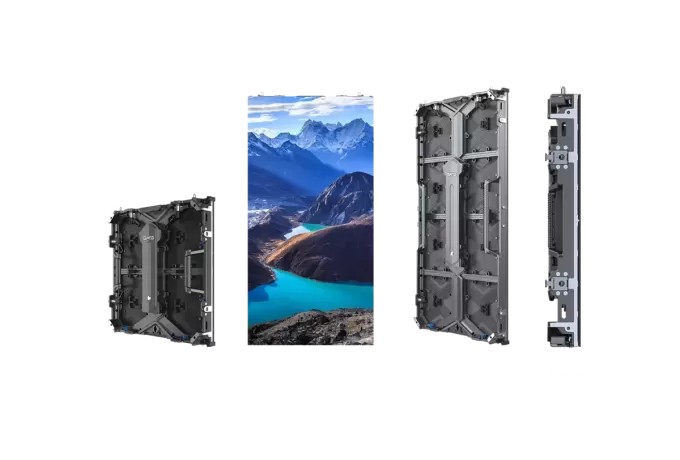
Dear friends who have just entered the industry, have you ever encountered this situation - you bought a large LED screen, but you were confused about the dense interface on the back? It’s like buying a new phone but finding that the charging port and headphone jack are gone. Don’t panic, let’s break this layer of window paper today!
Let me tell you the truth first. The interface of the LED screen is like the charging port of a mobile phone, and is hidden in the most convenient location for operation. However, this "convenience" is not something to be said casually, there are tricks here.
The first stop: Find the "ID card" area first
There is a metal nameplate on the back of each LED screen, and the interface area is usually within half a meter next to it. Why? Because engineers should consider convenient maintenance when designing! If the interface is hidden in a corner, the maintenance master will be cursing.
The second trick: identify the "Three Signal Brothers"
These three standard configurations are certainly indispensable in the main interface area:
For example, we installed a curved advertising screen for a shopping mall in Singapore. The interface area is designed to be 1 meter high on the right side of the screen. It can be operated without scaffolding during maintenance.
Now let’s play “Everyone finds fault” and see the abilities of different interfaces:
1. Video transmission of the Three Musketeers
2. Control signal line
3. Power artery
Pay attention to the color of the interface! Red is generally the main power supply (the outdoor screen must be connected to 380V), and black is the backup power supply. I have a cold knowledge - now all high-end floor tiles have smart power distribution, which can automatically switch power [user information].
A few days ago, a customer who opened a bar asked me: "Does there be more interfaces, the better?" This is as dangerous as asking "Does there be more girlfriends, the better?" Depend on actual needs:
Scene matching
We added a silicone seal to the fence screen made in a stadium in Tokyo, and the interface area will still be output 4K screens in a stable manner during heavy rains [user information].
The transmission distance must be calculated
Remember this formula: transmission distance = signal strength ÷ interference coefficient. Ordinary network cables can transmit 30 meters, and optical fibers can transmit 300 meters. If the distance is more than 50 meters, remember to install a signal amplifier.
The most easiest pitfalls for beginners, I will list them and remember them:
Don't let the interface "drink milk tea"
Even if the IP65 protection [user information] is marked, do not let the interface area face the air conditioner drain. Previously, a customer installed the screen directly above the milk tea shop operating table, and the interface was rusted after half a year.
Plug and unplug should be a "feeling of ceremony"
The plug-in and unplug are comparable to the "breakup cannon", and no matter how loving the interface is, it cannot withstand such tossing. The correct way is to turn off the power first → wait for 10 seconds → unplug the wire.
Regular "physical examination" must not be missed
It is recommended to do interface maintenance every month:
After working in the display industry for so many years, I found an interesting phenomenon - the more advanced the interface technology, the simpler the operation. Just like today's smartphones, although the chips are complicated, they can be fools when used.
Those manufacturers who are obsessed with the number of interfaces are like chefs who only know how to pile up materials. A true expert can solve complex needs with the simplest interface solution. Just like the transparent window screen we made for a Korean department store, we use the original composite interface to make power, signal and control three-in-one, saving 60% of the installation time [user information].
Finally, let’s say the heart-wrenching words: the interface is like the "Ren and Du meridians" of the display screen. Only by finding the right position and using the right method can the entire screen be "live". Next time, I will see the small holes on the back, so don’t be scared again!
for more product information and pricing, please contact us .